
CP53E notice: how to add bank details and release your refund
Short answer
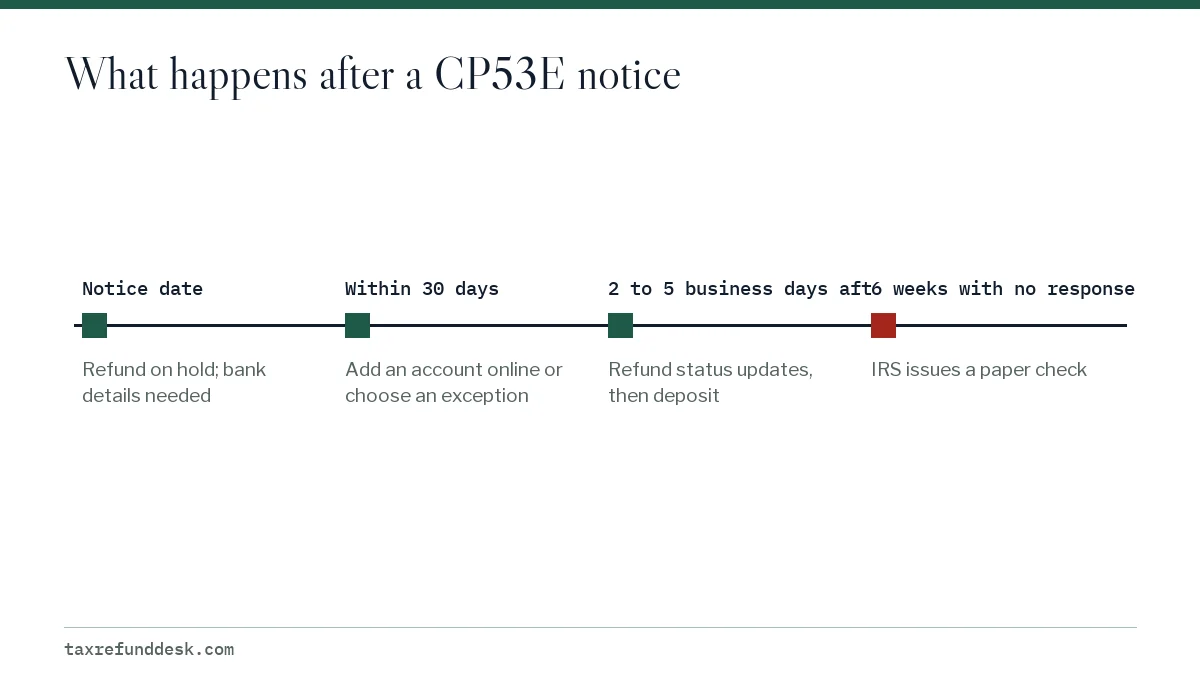
A CP53E notice tells you the IRS owes you a refund but is holding it because your bank information was missing, invalid or rejected. You have 30 days to add or fix a bank account, or choose a paper-check exception, in your IRS online account. If you do nothing, the IRS issues a paper check after 6 weeks.
- 01Time to respond
- 30 days
- 02Where to respond
- IRS Individual Online Account only
- 03Chances to add a bank account
- One
- 04Status update after you respond
- 2 to 5 business days
- 05If you do nothing
- Paper check after 6 weeks
What is a CP53E notice?
A CP53E notice is an IRS letter saying you have a refund coming but the IRS cannot pay it electronically with the bank details it has. The refund is not denied or reduced. It is paused until you give the IRS a working account or qualify for a paper check.
The CP53E exists because of Executive Order 14247 (March 25, 2025), which moves federal payments from paper checks to electronic payments. The IRS began phasing out paper refund checks for individuals on September 30, 2025, and the CP53E is the letter it uses when an electronic payment cannot go through.
Why did I get a CP53E letter from the IRS?
The IRS lists a few triggers on its CP53E page. Each one ends at the same place: a refund with nowhere electronic to go.
| Trigger | Example |
|---|---|
| Bank information missing | You filed a paper return and left the direct deposit lines blank |
| Bank information invalid | A routing number with a wrong digit that does not match any bank |
| Deposit rejected by the bank | The account was closed, or the name on it did not match |
| A refund appeared after IRS corrections | The IRS found unreported estimated payments or fixed a math error, and a return that showed no refund now has one |
If the rejection came from a closed account, refund sent to a closed bank account explains what the bank did with the money before the notice was sent.
How do I add my bank account for a CP53E?
You respond to a CP53E only through your IRS Individual Online Account. The IRS says its employees cannot add or change bank information, so calling will not speed this up.
- Go to IRS.gov by typing the address yourself, then sign in to your Individual Online Account or create one.
- On Account Home, open Notifications.
- Select the notification titled Add bank account.
- Follow the prompts to enter the routing number and account number for your account.
- Review every digit, then submit. You get one chance to add or update the account this way.
- Wait 2 to 5 business days for your refund status to update, then check Where's My Refund.
More on the account screens is on update bank info in your IRS online account.
The paper check exception
The same online account lets you ask for a paper check instead, but only under limited exceptions. The IRS questions and answers on Executive Order 14247 describe them as hardship, legal or procedural requirements, and cases where no electronic option exists.
If you do not have a bank account, the IRS points to two electronic alternatives before a paper check: prepaid debit cards and mobile payment apps that provide routing and account numbers. The refund without a bank account page compares them.
What happens if I ignore CP53E?
Nothing is lost, but you wait longer. If you do not respond within 30 days, the IRS issues a paper check after 6 weeks, according to its CP53E page. The check goes to the address on file, so an out-of-date address can turn a slow refund into a missing one.
| What you do | What happens | Approximate date |
|---|---|---|
| Add an account on August 10 | Status updates in 2 to 5 business days | By about August 17 |
| Choose a paper-check exception | Check mailed to your address on file | Timing not published |
| Nothing | IRS issues a paper check after 6 weeks | About September 14 |
If the check then fails to arrive, the tax refund not received page explains when and how to start a trace.
Is a CP53E a scam?
The CP53E is a real IRS notice, but scammers copy real notices. The safe approach is to never use a link, QR code or phone number from a letter, email or text to enter bank details. Type IRS.gov into your browser yourself and sign in to your online account; a genuine CP53E will appear there as an Add bank account notification.
- The IRS tells people responding to a CP53E to confirm the site shows a lock icon or https:// and that .gov appears in the address.
- The real process runs only through your IRS online account, since IRS staff cannot take bank details by phone.
- A message asking you to read your bank numbers to a caller, or to enter them on a site that is not IRS.gov, does not match the CP53E process.
CP53E versus CP53, and special situations
The two notices sound alike but ask for opposite things. A CP53E asks you to act. A CP53 says the IRS could not deposit your refund and is already mailing a check, which should arrive within 4 weeks of the notice date; see the CP53 notice page.
If the CP53E is addressed to someone who has died, the refund belongs to the estate or surviving spouse and follows a separate claims process; start with refunds for a deceased taxpayer.
Step by step
Confirm the notice is real
Type IRS.gov yourself and sign in to your Individual Online Account instead of using any link or number from a message.
Open the notification
On Account Home, open Notifications and select Add bank account.
Enter bank details once
Enter routing and account numbers for an account in your name, your spouse's name or a joint account, and check each digit.
Or request an exception
If you qualify for a hardship or other exception, choose the paper-check option instead.
Watch for the update
Allow 2 to 5 business days, then check Where's My Refund.
Common questions
Can I call the IRS to respond to a CP53E?
No. The IRS says employees cannot update bank account information. You add the account, or request a paper-check exception, in your IRS Individual Online Account.
How long does it take to get my refund after responding to CP53E?
The IRS says to allow 2 to 5 business days for your refund status to update after you add bank details. The deposit follows the updated status.
What if I make a mistake entering my bank account for CP53E?
The IRS allows one chance to add or update the account online, so a wrong number can leave the refund stuck again. Check every digit before submitting, and copy the numbers from your bank's app or a current statement rather than from memory.
Does a CP53E mean I owe the IRS money?
No. A CP53E is sent because you are due a refund. It does not reduce the refund or create a balance due.
I don't have an online account. Can I still respond to CP53E?
You need to create one; the online account is the only response channel the IRS lists. If you cannot, the IRS issues a paper check after 6 weeks.
Sources
- Understanding your CP53E notice irs.gov
- Questions and answers about Executive Order 14247 irs.gov
- Direct deposit changes for 2026 could affect how and when you get your refund, Taxpayer Advocate Service taxpayeradvocate.irs.gov
- Understanding your CP53 notice irs.gov
- Direct deposit refunds and refund offsets, Taxpayer Advocate Service taxpayeradvocate.irs.gov
We check figures against these official pages. Rules change; confirm anything that affects a deadline or payment with the agency before you act.
Tell us what happened
Describe your situation and our editors will use it to improve this guide. If you leave your email, we may reply with a pointer to the right page or official contact. We never share your details.
Related guides
 Tax Refund Not Received: Steps to Find a Missing Refund
If your tax refund was not received, first confirm in Where's My Refund that the IRS actually sent it. A direct deposit counts as…
IRS Refund for a Deceased Person: How to Claim the Money
An IRS refund check for a deceased person can be claimed by a surviving spouse on a joint return, a court-appointed personal repr…
IRS CP53 Notice: Direct Deposit Failed, Check in the Mail
A CP53 notice means the IRS could not direct deposit your refund, so it is mailing you a paper check instead. The IRS says the ch…
Refund Sent to a Closed Account? What Happens and How Long
A tax refund sent to a closed bank account is normally not lost: the bank rejects the deposit and the money goes back to the Trea…
Get an IRS Refund Without a Bank Account: Your Options
You can get an IRS refund without a bank account by having it deposited to a prepaid debit card or mobile app account that has it…
Update Refund Bank Info in Your IRS Online Account
You can add or change the IRS direct deposit account for a refund online only when the IRS has frozen that refund and sent a CP53…