
How to get an IRS refund without a bank account
Short answer
You can get an IRS refund without a bank account by having it deposited to a prepaid debit card or mobile app account that has its own routing and account numbers, which the IRS treats as direct deposit. If no electronic option works for you, a paper check is available only under limited exceptions, requested after a CP53E notice, and it takes longer.
- 01What an electronic option needs
- A routing number and an account number in your name
- 02Where to find a low-cost account
- FDIC GetBanked or MyCreditUnion.gov
- 03Where to request a check exception
- IRS Individual Online Account, after a CP53E
- 04Check if you ignore a CP53E
- Issued after 6 weeks
- 05Typical prepaid card fees (CFPB)
- Vary widely; most charge for out-of-network ATMs
Can you get an IRS refund without a bank account?
Yes. Getting an IRS refund without a bank account is possible in three ways: a prepaid debit card that accepts direct deposit, a mobile payment app account that gives you routing and account numbers, or a paper check if you qualify for an exception. The first two count as direct deposit, so they are as fast as a bank deposit.
What you cannot do anymore is simply leave the bank lines blank and wait for a check. Since the IRS began phasing out paper refund checks on September 30, 2025, a refund with no deposit details is frozen until you respond to a CP53E notice. An unbanked tax refund therefore needs a plan before you file, not after.
Your options if you are unbanked
| Option | What you need | Speed | Watch for |
|---|---|---|---|
| Prepaid debit card | Card account with routing and account numbers, registered in your name | Same as direct deposit | Load, ATM and monthly fees |
| Mobile payment app | App account that issues routing and account numbers | Same as direct deposit | Whether the app accepts government deposits and the account name matches |
| New low-cost bank or credit union account | ID and a small opening deposit, depending on the institution | Same as direct deposit | Account must be open and active before the refund posts |
| Paper check exception | Hardship, legal or procedural reason, or no electronic option | Slowest; timing not published | Needs a CP53E response or waits 6 weeks |
The IRS directs people looking for an account to FDIC.gov/GetBanked and MyCreditUnion.gov. Its payment modernization page also says Treasury-sponsored electronic alternatives may be available for people with no digital option, with details to be released as the program develops; as of September 2026 no specific product has been named.
Can my tax refund go on a prepaid card?
Yes, if the card has a routing number and an account number and the card account is in your name. The IRS direct deposit page lists prepaid debit cards among accepted destinations. Look in the card's app or website for a section called direct deposit, which shows both numbers.
- Confirm the card account is registered with your legal name, matching your tax return.
- Find the routing and account numbers in the card's direct deposit settings. The long number printed on the front of the card is usually a different number.
- Enter them in the refund section of your return and mark the account type the card issuer tells you to use, usually checking.
- Read the card's terms for deposit or balance limits, and ask the issuer what happens to a deposit above them.
- Remember the three-refund limit: no more than three federal refunds can be deposited to one card.
Using an IRS refund mobile app account
An IRS refund mobile app deposit works the same way as a card. The IRS accepts deposits to certain mobile apps that provide routing and account numbers. The app account, not just your phone number or username, must be in your own name; sending a refund to a friend's app account breaks the ownership rule and is likely to be rejected.
Before filing, send a small test deposit from an employer or another source if you can, so you know the numbers work. A rejected deposit today does not simply turn into a check; the Taxpayer Advocate Service reports that most bank-rejected refunds are frozen until the taxpayer acts.
How do I request a paper check waiver?
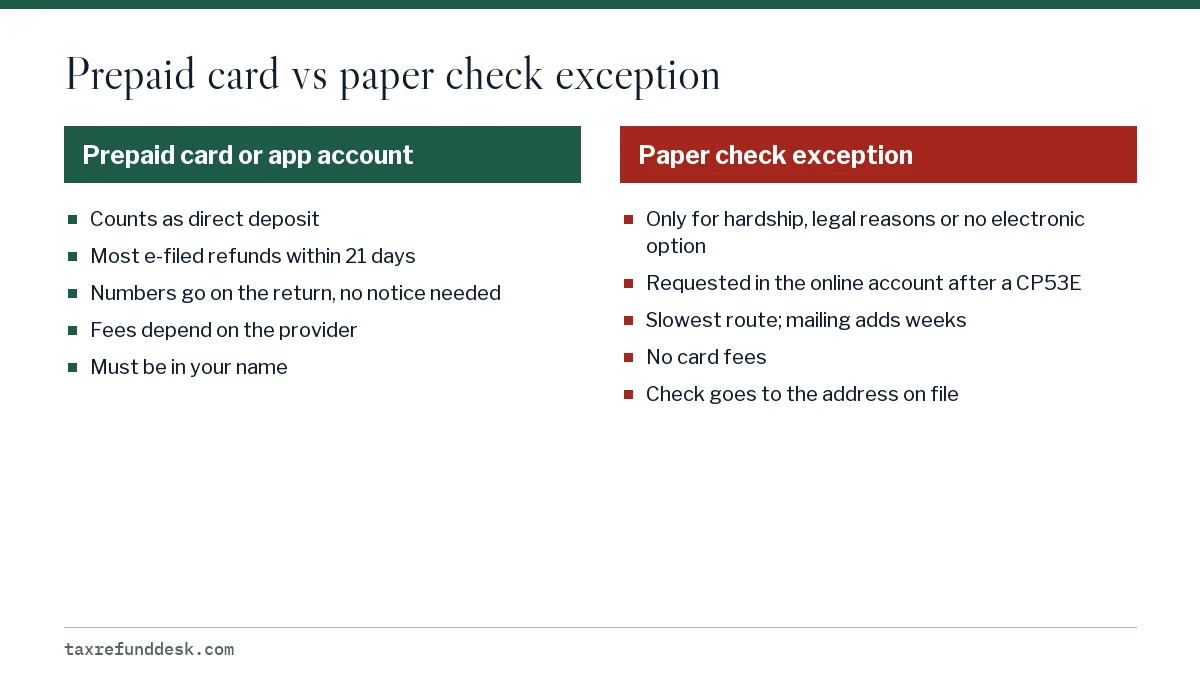
You request it through your IRS Individual Online Account after the IRS sends a CP53E notice about your refund. The notice creates a notification in the account, where you can choose the paper-check exception instead of entering bank details. You have 30 days from the notice date.
The IRS describes the exceptions as hardship, legal or procedural requirements, and cases where no electronic option is available. It has not published a detailed checklist. If you cannot open an online account, which requires identity verification with photo ID, contact the Taxpayer Advocate Service; its 2026 mid-year report criticized the notice for leaving out waiver information and noted that most recipients had no online account.
Adding an account later uses the same notification; the screens are described on update bank info in your IRS online account. Background on why the exceptions exist is on IRS paper checks phase-out.
How much longer does a refund take without a bank account?
With a card or app, no longer at all: most e-filed direct deposit refunds arrive within 21 days, according to the IRS. The delay comes when there are no deposit details on the return.
| Route | Approximate timing |
|---|---|
| Card or app numbers on the return | Within 21 days of acceptance |
| No details, account added after CP53E | Processing time, plus the notice, plus 2 to 5 business days for status to update |
| No details, exception requested after CP53E | Processing time, plus the notice, plus mailing; IRS has not published a timeframe |
| No details, no response to CP53E | Paper check issued after 6 weeks |
The National Taxpayer Advocate reports that people who ended up needing paper refunds in 2026 faced delays of 6 weeks or more. For the general deposit rules, see the IRS refund direct deposit guide.
Common questions
Can I get my tax refund on a payment app card?
The IRS accepts deposits to mobile app accounts that provide a routing number and account number in your name. Check the app's direct deposit settings for both numbers and confirm it accepts federal government deposits.
Can I use someone else's bank account for my refund if I don't have one?
No. The IRS requires the account to be in your name, your spouse's name, or a joint account that includes you. Use a prepaid card or app account in your own name instead.
Where can I open a free bank account for my tax refund?
The IRS points people to FDIC.gov/GetBanked and MyCreditUnion.gov, which explain how to find low-cost bank and credit union accounts. Open it before you file so the numbers are ready.
What if I file with no bank account and never respond to the IRS?
The refund is frozen, the IRS sends a CP53E, and if you do not respond within the notice period it issues a paper check after 6 weeks to the address on your return.
Do I need an IRS online account to get a paper check?
The online account is the route the IRS lists for requesting the exception. If you cannot create one, you can still receive a check by waiting out the 6-week period, or ask the Taxpayer Advocate Service for help if the delay causes hardship.
Sources
- Questions and answers about Executive Order 14247 irs.gov
- Understanding your CP53E notice irs.gov
- Modernizing payments, IRS irs.gov
- Get your refund faster: direct deposit to one, two or three accounts irs.gov
- National Taxpayer Advocate issues 2026 mid-year report to Congress irs.gov
- Guide to filing your taxes, Consumer Financial Protection Bureau consumerfinance.gov
We check figures against these official pages. Rules change; confirm anything that affects a deadline or payment with the agency before you act.
Tell us what happened
Describe your situation and our editors will use it to improve this guide. If you leave your email, we may reply with a pointer to the right page or official contact. We never share your details.
Related guides
 IRS Refund Direct Deposit: Rules, Options and Limits
IRS refund direct deposit is now the standard way individual refunds are paid: since September 30, 2025 the IRS has been phasing…
Update Refund Bank Info in Your IRS Online Account
You can add or change the IRS direct deposit account for a refund online only when the IRS has frozen that refund and sent a CP53…
IRS Paper Refund Checks: Phase-Out Rules and Exceptions
The IRS began phasing out paper checks for individual tax refunds on September 30, 2025, under Executive Order 14247. It still ma…
IRS CP53E Notice: Add Bank Details to Release Your Refund
A CP53E notice tells you the IRS owes you a refund but is holding it because your bank information was missing, invalid or reject…
Refund Advance Loan: How It Works and What to Check
A refund advance loan is a short-term loan that a tax preparation company arranges against part of your expected federal refund,…