
How to add or update your IRS direct deposit account online
Short answer
You can add or change the IRS direct deposit account for a refund online only when the IRS has frozen that refund and sent a CP53E notice. You then have 30 days to enter the account once in your IRS Individual Online Account, under Notifications, and the IRS says to allow 2 to 5 business days for your refund status to update.
- 01When the online update is available
- Only after a CP53E notice
- 02Deadline
- 30 days from the notice date
- 03Attempts allowed
- One
- 04Can IRS phone staff change it?
- No
- 05Status update after you submit
- About 2 to 5 business days
When can you change your IRS direct deposit account?
Your IRS direct deposit account can be changed online in one situation: the IRS has held your refund because the bank details on your return were missing, invalid or rejected, and it has mailed you a CP53E notice. The notice switches on an Add bank account notification in your IRS Individual Online Account. Without that notice there is no screen for changing refund bank details.
| Your situation | Can you change the account? | What to do |
|---|---|---|
| Return not yet submitted | Yes | Fix the numbers in your software or on the paper form before filing |
| E-filed and accepted, refund processing normally | No online option | Wait; if the deposit fails, the IRS freezes the refund and sends a CP53E |
| Return accepted but not yet posted to IRS systems | Possibly, by stopping the deposit | The IRS direct deposit page says to contact the IRS before the return posts |
| CP53E received | Yes, once | Add the account in the online account within 30 days |
| Refund already deposited to a wrong account | No | Contact the bank, then start a refund trace |
The last row is the painful one. The IRS says it is not responsible for account numbers entered wrongly by you or your preparer, and if the wrong account is open and accepts the deposit, the money is gone from the IRS's side. Refund sent to the wrong account covers the recovery steps.
Before you sign in: IRS login with direct deposit access
The update happens inside the IRS Individual Online Account, so you need a working login first. New users verify identity with photo identification through the IRS sign-in service; the process is explained on ID.me IRS verification. Do this as soon as the notice arrives, because verification problems can use up a large part of the 30 days.
- The CP53E notice, to confirm the tax year and refund amount.
- Your routing number, 9 digits, from your bank's app, website or a current statement.
- Your full account number, copied the same way.
- Whether the account is checking or savings.
- A photo ID, if you still need to create the online account.
How to add IRS direct deposit online, step by step
The IRS CP53E page lays out a short sequence. These steps follow it, with the checks that stop the one allowed attempt from being wasted.
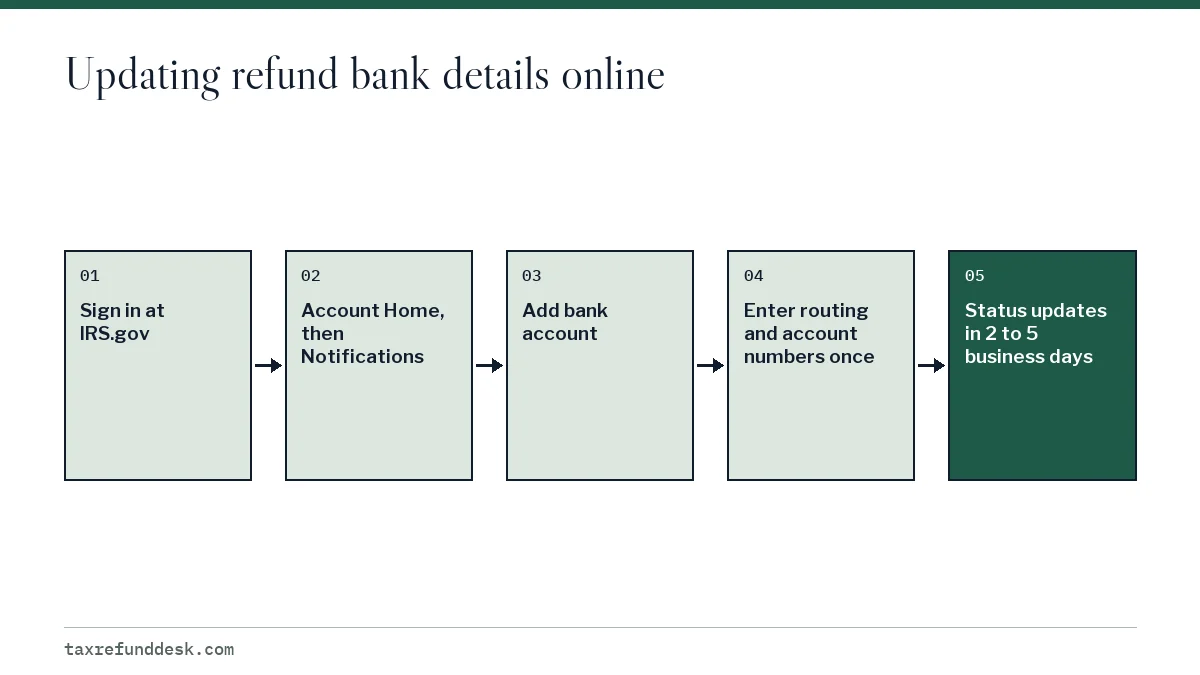
- Go to IRS.gov and choose Sign in to your Individual Online Account, or create an account.
- On Account Home, open Notifications.
- Select the Add bank account notification. It appears only when a CP53E has been issued for your refund.
- Enter the routing number, the account number and the account type, following the prompts.
- Compare each digit against your bank's app before you submit. There is no second try online.
- Submit and note the date.
- After 2 to 5 business days, check Where's My Refund or the refund status in your online account.
If you do not have an account at all, the same notification offers a paper-check exception for limited cases. That choice and its alternatives, such as a prepaid card with routing and account numbers, are compared on refund without a bank account.
The one-chance limit, and what if you get it wrong?
The IRS allows one online attempt to add or update the account for a CP53E. Its employees cannot enter or change bank information for you, so a phone call cannot fix a typo. If the account you enter is rejected by the bank, the CP53E page says the IRS will issue a paper check.
| Mistake | Likely result |
|---|---|
| Routing and account numbers swapped | Deposit rejected; paper check |
| Account in a relative's name | Rejected or refused under the ownership rule; paper check |
| Account closed before the deposit arrives | Bank returns the funds; paper check |
| Fourth refund into the same account this year | Not deposited under the three-refund limit |
| Missed the 30-day window | No online option; check issued after 6 weeks |
The ownership rule is strict: the account must be in your name, your spouse's name or a joint account with both. This is the same rule that governs the IRS direct deposit information on a tax return, explained in full on the IRS refund direct deposit guide.
Timing after the update
The IRS says to allow about 2 to 5 business days for the refund status to change after you submit the account. The deposit follows once the status shows the refund as sent, and banks may not post deposits on weekends or federal holidays.
Worked example
Suppose a CP53E is dated Monday, March 1, 2027 and arrives on Thursday, March 4. You sign in on Friday, March 5 and add your checking account. Two to five business days later puts the status update between Tuesday, March 9 and Friday, March 12. If instead you ignored the notice, the paper check would be issued about 6 weeks after the notice, around mid-April, and would still need time in the mail.
The dates in this example are illustrations for the 2027 season, whose opening date the IRS has not yet announced; it usually confirms it in January.
Getting IRS direct deposit information on your tax return right the first time
Most CP53E notices can be avoided by entering good numbers at filing. On Form 1040 the refund section asks for the routing number, the account type and the account number. Paper filers who want to send parts of the refund to two or three accounts attach Form 8888; see Form 8888 split refunds.
- Use the numbers your bank lists for direct deposits, which can differ from the numbers printed on old checks.
- Check the account type box. A savings account marked as checking can be rejected.
- Update your address with the IRS too. If the deposit fails and a check is issued, it goes to the address on file.
- Keep the account open until the refund posts.
If your refund has already been deposited somewhere you do not recognize, the problem is no longer a bank-info update but a missing refund; start with tax refund not received.
Step by step
Sign in
Type IRS.gov and sign in to, or create, your Individual Online Account with photo ID ready.
Open Notifications
From Account Home, open Notifications.
Choose Add bank account
Select the Add bank account notification created by your CP53E.
Enter the account once
Enter the routing number, account number and account type for an account in your name, your spouse's name or a joint account, and check every digit.
Wait and check status
Allow 2 to 5 business days, then check Where's My Refund or your online account.
Common questions
Can I change my direct deposit information with the IRS after filing?
Only if the IRS has frozen your refund and sent a CP53E notice. You then get one chance to add or update the account in your IRS Individual Online Account within 30 days of the notice date.
Can the IRS change my bank info over the phone?
No. The IRS says its employees cannot update bank account information for a CP53E refund. The change must be made in your online account.
Why don't I see the Add bank account option in my IRS online account?
The notification appears only when a CP53E has been issued for your refund. If you have not received the notice, the IRS has not asked for new bank details, and there is nothing to update online.
What happens if the new bank account I entered is rejected?
The IRS says it will issue a paper check. Because only one online attempt is allowed, you cannot enter a second account.
How long after updating my bank info will I get my refund?
The IRS says to allow about 2 to 5 business days for the refund status to update. The deposit follows, and weekends and federal holidays can add a day or two at the bank.
Can I use the online account to add bank details for next year's refund?
No. Future refunds use the bank details on the return you file. Enter them carefully in your software or on Form 1040, or on Form 8888 if you are splitting the refund.
Sources
- Understanding your CP53E notice irs.gov
- Your online account, IRS irs.gov
- Get your refund faster: direct deposit to one, two or three accounts irs.gov
- Direct deposit refunds and refund offsets, Taxpayer Advocate Service taxpayeradvocate.irs.gov
- Lost or stolen refund, Taxpayer Advocate Service taxpayeradvocate.irs.gov
We check figures against these official pages. Rules change; confirm anything that affects a deadline or payment with the agency before you act.
Tell us what happened
Describe your situation and our editors will use it to improve this guide. If you leave your email, we may reply with a pointer to the right page or official contact. We never share your details.
Related guides
 IRS Refund Direct Deposit: Rules, Options and Limits
IRS refund direct deposit is now the standard way individual refunds are paid: since September 30, 2025 the IRS has been phasing…
Form 8888: How to Split Your Tax Refund Into Accounts
Form 8888, Allocation of Refund, tells the IRS to split one federal refund by direct deposit into two or three accounts at US fin…
Get an IRS Refund Without a Bank Account: Your Options
You can get an IRS refund without a bank account by having it deposited to a prepaid debit card or mobile app account that has it…
IRS CP53E Notice: Add Bank Details to Release Your Refund
A CP53E notice tells you the IRS owes you a refund but is holding it because your bank information was missing, invalid or reject…
Refund Sent to Wrong Bank Account? How to Get It Back
A refund sent to the wrong bank account usually comes back: the bank rejects the deposit, the money returns to the IRS, and the I…