
IRS CP05A notice: what to send so your refund is released
Short answer
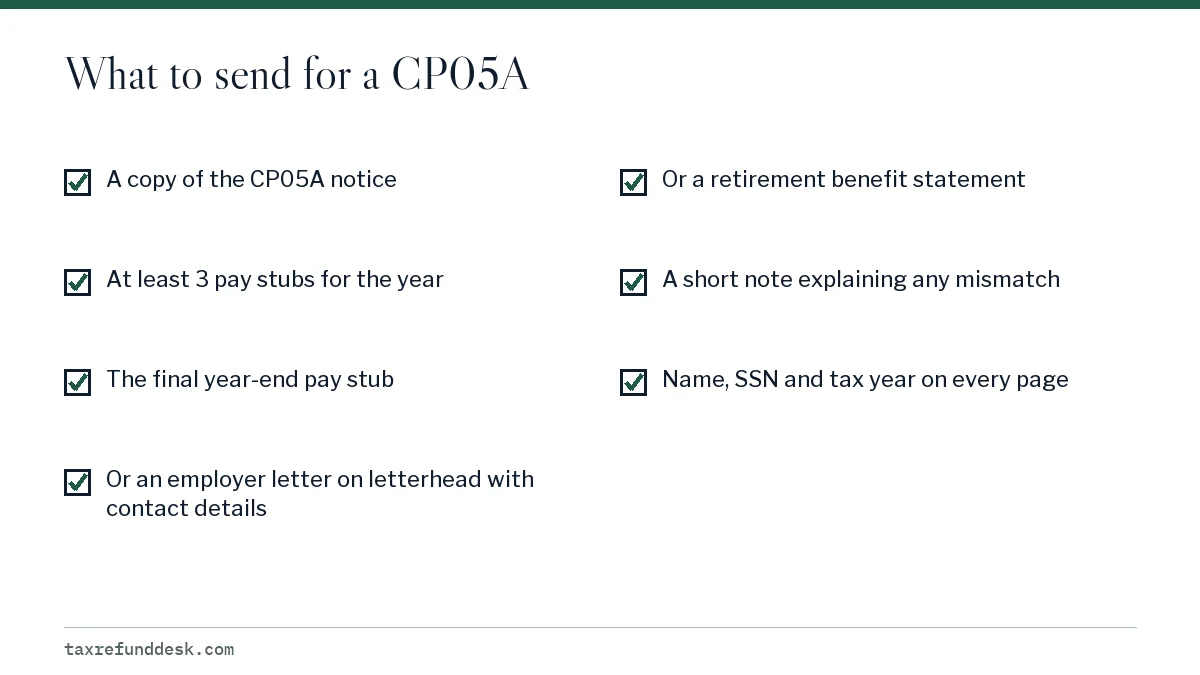
An IRS CP05A notice means the IRS is holding your refund until you prove the wages you reported and the federal tax withheld from them. Reply with a copy of the notice plus at least three pay stubs including your year-end stub, an employer letter on company letterhead, or a retirement benefit statement. Allow about 60 days from the date you send them.
- 01What it verifies
- Income and federal tax withholding
- 02Action required
- Yes, send documents by the date on the notice
- 03Minimum pay stubs
- 3, including a year-end stub
- 04Ways to reply
- Document Upload Tool, fax or mail
- 05Review time after reply
- About 60 days from when you send documents
What the IRS CP05A notice asks for
The IRS CP05A notice is a request for proof. Before the IRS will release your refund, it wants documents showing three things for the tax year printed on the notice: the dates you earned the wages, the gross amount you were paid, and the federal income tax that was withheld.
Your refund is frozen while the IRS waits. Nothing moves until your documents arrive and a reviewer compares them with your return and with what employers reported. If you do nothing, the hold stays in place, so this is not a letter to set aside.
A CP05A is one of several ways a refund gets pulled out of automatic processing; the tax refund delayed overview covers the others.
IRS CP05A meaning: how it differs from a CP05
The two notices sound alike but ask for opposite things. A CP05 tells you the IRS is checking income, withholding, credits or business income and that you do not need to act; you simply wait up to 60 days from the notice date. A CP05A tells you the review cannot finish without paperwork from you.
| Point | CP05 | CP05A |
|---|---|---|
| Refund status | Held for review | Held for review |
| Do you send anything? | No | Yes, wage and withholding proof |
| Deadline | None; wait 60 days before calling | Reply date printed on the notice |
| What ends the hold | IRS finishes its own check | IRS reviews the documents you send |
If you received a CP05 first and a CP05A later, the second notice controls. Treat it as a request with a due date. Our separate page on the CP05 refund review notice explains the wait-only version in more detail.
Documents to gather for an IRS CP05A letter
The IRS accepts three kinds of proof for a CP05A. You do not need all three. Pick the one that most clearly shows each employer's pay and withholding for the full year.
Pay stubs
Send at least three pay statements or check stubs, and make one of them the final stub of the year. The year-end stub matters most because its year-to-date totals should match box 1 and box 2 of your Form W-2. If you had more than one job, send stubs for each employer whose wages appear on the return.
Employer letter
If you cannot find stubs, ask the employer's payroll or HR office for a letter on company letterhead. The IRS says it must include the employer's name, address, telephone and fax number, and it should show when you earned the wages, your gross pay for the year and the federal tax withheld.
Retirement income statements
For pension or annuity income, a benefit statement from the plan showing gross payments and federal withholding does the same job. Pair it with the Form 1099-R if you have it.
How to send your CP05A response
The notice gives three reply channels. Whichever you use, the IRS says your reply must include a copy of the notice. Use only one channel, and keep proof of what you sent and when.
- Document Upload Tool. Go to the IRS link or scan the QR code printed on the notice. Uploading is the fastest route and gives you a confirmation you can save.
- Fax. Use the fax number on the notice itself. Put the first page of the notice on top and keep the fax confirmation sheet.
- Mail. Send copies, not originals, to the address on the notice with the tear-off response page. Certified mail gives you a delivery record.
Write your name, Social Security number and the tax year on every page. Loose pages can be separated from your case, and an unlabeled stub may be ignored.
Timing: when you get the refund after you respond
The IRS asks you to allow 60 days from the date you provide your documents for it to finish the review. That matches the Taxpayer Advocate Service guideline of roughly 60 days to finish a case once requested information arrives.
If your documents support the return, the hold is released and the refund is issued, usually by direct deposit if you gave bank details. If the IRS finds the withholding or wages were overstated, it adjusts the return and sends a notice showing the new amount. A reduced refund usually comes with a CP12 notice, which explains the change and your right to disagree.
On your IRS account transcript, a review hold often shows as transaction code 570. When the review ends you may see TC 571 or a zero-amount TC 290, followed by TC 846 with the refund date.
If 60 days pass with no answer
Check Where's My Refund and your online account transcript first. If nothing has changed, call the number on the notice with a copy of what you sent. If the hold is now causing real financial harm, such as an eviction or shut-off notice, see how an IRS hardship refund request works.
Common CP05A mistakes that restart the wait
- Sending only a W-2. The IRS says a Form W-2 on its own is not enough; send pay stubs, an employer letter or a benefit statement.
- Sending two stubs, or none from the end of the year, so the annual totals cannot be confirmed.
- Filing Form 1040-X instead of replying. An amended return is not a reply to the notice, so the hold stays until the requested proof arrives.
- Replying after the date on the notice without a note explaining the delay.
- Mailing to a general IRS address instead of the address printed on the CP05A.
If another letter arrives asking for different items, such as a missing schedule or form, that is usually a Letter 12C and it needs its own reply.
Step by step
Read the notice
Confirm the tax year and the reply date printed on the CP05A.
Gather proof
Collect at least three pay stubs including a year-end stub, or an employer letter, or a retirement benefit statement.
Label every page
Add your name, SSN and tax year to each page.
Send one way
Use the Document Upload Tool, the fax number or the mailing address on the notice.
Wait and track
Allow about 60 days, then check Where's My Refund and your transcript before calling.
Common questions
What does IRS CP05A mean?
It means the IRS will not release your refund until you send documents proving your wages and the federal tax withheld. It is a request for action, unlike a CP05, which only asks you to wait.
Is a CP05A an audit?
No. It is a pre-refund verification of income and withholding. The IRS may adjust your return if the documents do not support it, but the notice itself is not an examination.
Can I just send my W-2 for a CP05A?
The IRS lists pay stubs, an employer letter on letterhead or retirement benefit statements as proof. Send one of those, and add the W-2 only as a supporting copy.
How long after answering a CP05A do I get my refund?
Allow about 60 days from the date you sent documents. Upload through the Document Upload Tool for the quickest delivery.
What if my employer went out of business?
Send whatever pay stubs, bank deposit records and year-end statements you have, with a short note explaining that the employer closed. Keep copies of everything you send.
Sources
- Understanding your CP05A notice irs.gov
- Understanding your CP05 notice irs.gov
- Held or stopped refunds, Taxpayer Advocate Service taxpayeradvocate.irs.gov
- Understanding your CP12 notice irs.gov
We check figures against these official pages. Rules change; confirm anything that affects a deadline or payment with the agency before you act.
Tell us what happened
Describe your situation and our editors will use it to improve this guide. If you leave your email, we may reply with a pointer to the right page or official contact. We never share your details.
Related guides
 Tax Refund Delay: 7 Causes, How Long Each Takes, What to Do
A tax refund delay means the IRS has pulled your return out of automatic processing, most often for an EITC or ACTC hold until mi…
IRS Hardship Refund Request: How to Ask for a Faster Refund
An IRS hardship refund request is a phone call or Form 911 asking the IRS to release a delayed refund early because the wait is c…
IRS Code 570 on Transcript: Refund Hold and 571 Release
IRS code 570 means additional liability pending or credit hold: it freezes your account so no refund or offset can go out until t…