
How to read your IRS transcript to track a refund
Short answer
To track a refund, use the IRS tax account transcript, not the tax return transcript: it is the only IRS transcript that lists dated transaction codes such as TC 150 (return posted) and TC 846 (refund issued). You can view it free in your IRS Individual Online Account or order it by mail, which takes 5 to 10 calendar days.
- 01Transcript that tracks refunds
- Tax account transcript
- 02Cost
- Free for every transcript type
- 03Online account years
- Current year plus 9 prior years
- 04Mail delivery
- 5 to 10 calendar days
- 05Paper request form
- Form 4506-T
Which IRS transcript shows your refund status?
The tax account transcript is the IRS transcript that shows refund progress. It lists basic return data such as filing status and taxable income, plus every payment, credit, hold and refund posted after you filed, each with a transaction code and a date.
The IRS offers five transcript types, all free (IRS, transcript types). Four of them are built for other jobs, such as proving income to a lender or confirming that you did not file.
| Transcript | What it shows | Years available | Useful for refund tracking |
|---|---|---|---|
| Tax account transcript | Return basics plus all later transactions | Current and 9 prior years online | Yes, the main one |
| Record of account | Return transcript and account transcript combined | Current and 3 prior years | Yes, but longer |
| Tax return transcript | Most lines of the return as originally filed | Current and 3 prior years | No, it never changes |
| Wage and income transcript | W-2, 1099, 1098 and 5498 data sent to the IRS | Current and 9 prior years | No, but helps check a mismatch |
| Verification of non-filing | States no processed return is on record | After June 15 for the current year | No |
How to get your IRS transcript online
Getting an IRS transcript online is the fastest route: the account transcript displays on screen and can be downloaded as a PDF. You need an IRS Individual Online Account, and creating one requires identity verification through the IRS sign-in provider, described on our ID.me verification page.
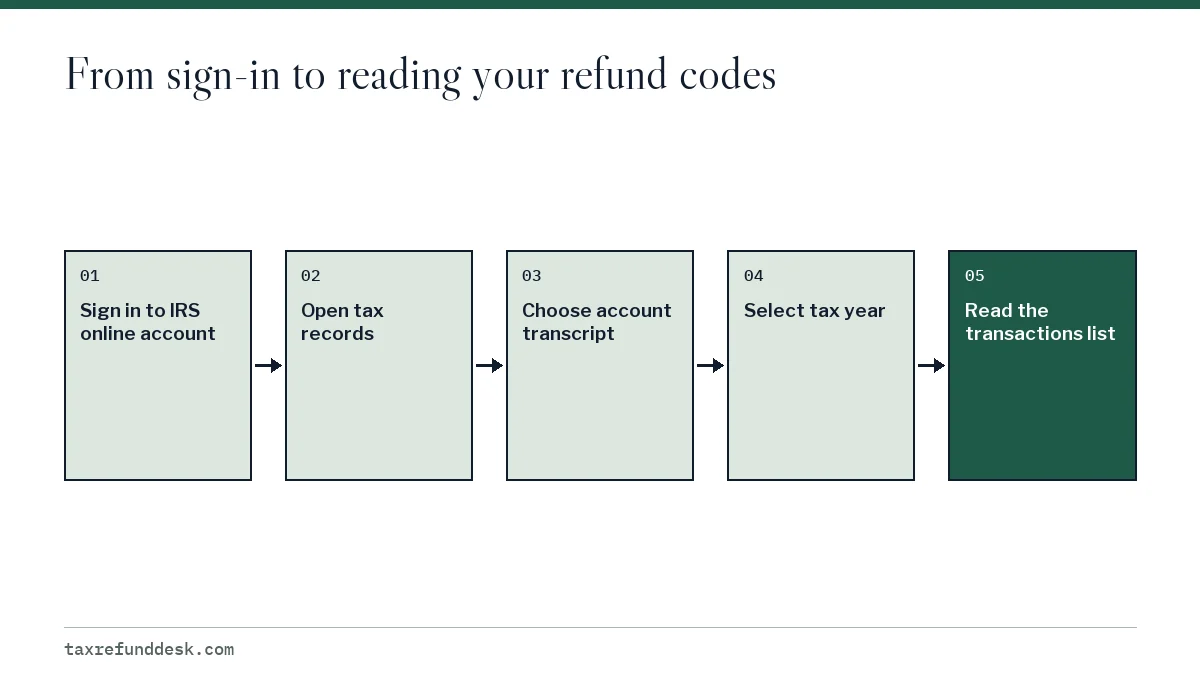
- Sign in to your IRS Individual Online Account at irs.gov.
- Open the section for tax records and choose to view transcripts.
- Select Account Transcript and the tax year. A return filed in 2026 is for tax year 2025.
- Open the PDF and scroll to the Transactions section.
The online account holds account transcripts for the current year and nine prior years. Older years require Form 4506-T.
IRS transcript request by mail, phone or Form 4506-T
If you cannot pass online identity checks, you can still make an IRS transcript request that arrives on paper at the address the IRS has on file. The IRS says to allow 5 to 10 calendar days for mail delivery.
| Method | How | What you get |
|---|---|---|
| Individual Online Account | Sign in at irs.gov | View, print or download right away |
| Get Transcript by Mail | Online form on irs.gov | Paper copy in 5 to 10 calendar days |
| Automated phone line | Call the IRS transcript line listed on the IRS transcript page | Paper copy by mail |
| Form 4506-T | Mail or fax the form | Any type, including years older than the online limit |
A mailed transcript is a snapshot. If you are waiting for a hold to be released, a paper copy can be out of date by the time it arrives, so the online version is better for tracking week to week.
Reading each section of an IRS account transcript
An IRS account transcript has three parts: a header, a block of return information, and a list of transactions. The refund story is in the transactions list, but the header tells you whether the refund is still owed.
The header and account balance
The top lists the tax period (for example, December 31, 2025), a masked taxpayer number and the account balance. A negative account balance means the IRS owes you that amount. A zero balance after a refund means it has been paid out. Accrued interest and penalty lines apply only if you owe.
The return information block
This block repeats key figures from the processed return: filing status, adjusted gross income, taxable income and tax per return. If these fields are blank or show zero, the return has not posted yet. If they differ from your copy, the IRS may have corrected the return, and a CP12 or CP11 notice should explain the change.
The transactions list
Each line shows a code, a short explanation, a date and an amount; many transcripts also show an eight-digit posting cycle. Read the lines top to bottom in date order. For the meaning of each code, use our list of IRS transcript codes; the first code to look for is TC 150, return filed.
Worked example: a refund on an IRS account transcript
Here is a simplified example for a single filer with $2,140 of tax and $5,000 of federal withholding, e-filed with direct deposit. The dates and cycle are illustrative, not a prediction for your return.
| Code | Explanation | Date | Amount |
|---|---|---|---|
| 150 | Tax return filed | 03-16-2026 | $2,140.00 |
| 806 | W-2 or 1099 withholding | 04-15-2026 | -$5,000.00 |
| 846 | Refund issued | 03-20-2026 | $2,860.00 |
The math: tax of $2,140 minus withholding of $5,000 leaves a credit of $2,860. The TC 846 debit of $2,860 pays that credit out, and the account balance returns to $0.00. Withholding carries the April due date because federal law (Internal Revenue Code section 6513) treats tax withheld during the year as paid on that date, which is why its line can be dated later than the refund's.
If a TC 570 had posted after the 150 instead, the balance would stay at -$2,860.00 with no 846 until the IRS released the hold. The number beside the 150 line in the cycle column is explained in our IRS cycle code chart.
Checking your IRS account transcript week to week
If your refund is late, pull the account transcript once a week and compare it with the last copy rather than reading each one fresh. New transactions post in IRS processing cycles, so checking several times a day rarely shows anything new.
- Compare the account balance. A move from negative to $0.00 means a refund was issued or applied somewhere.
- Look for new lines at the bottom of the list and note their dates.
- Check whether any hold code (570 or 810) now has a matching release (571 or 811).
- Match any new notice line with a letter in your mail before acting on it.
- Save each copy as a PDF with the download date in the file name, so you have a record if you need help from the Taxpayer Advocate Service.
The Taxpayer Advocate Service guideline for IRS reviews is 45 to 180 days depending on complexity, so a transcript that stays the same for several weeks during a review is normal.
Why does my IRS transcript say no record?
A no-record message on a current-year account transcript usually means the return has not finished initial processing, so no TC 150 has posted. It does not by itself mean the IRS lost your return.
- Too soon: e-filed returns can take a few weeks to post; paper returns take far longer. The IRS says mailed returns take 6 weeks or more to refund.
- Wrong year: check that you chose the tax year on the return, not the year you filed.
- Amended return: a Form 1040-X shows on the original year's transcript, not as a separate record; see our amended return transcript page.
- Identity hold: if the IRS stopped the return for identity verification, it may not post until you verify. Check your mail for Letter 5071C or a CP5071 notice.
What an IRS transcript cannot tell you
A transcript is a record of what has posted, so it lags behind decisions the IRS has already made and says nothing about the reasons behind a hold. It will not show which document a reviewer needs, and it will not show the bank's posting date.
Use it alongside Where's My Refund, which updates once a day, and read any IRS letter first. If the transcript and Where's My Refund disagree, the most recent dated item usually reflects the newer information.
Step by step
Choose the account transcript
Select the tax account transcript, which lists dated transaction codes, rather than the tax return transcript.
Sign in or order
View it in your IRS Individual Online Account, or order it by mail, phone or Form 4506-T and allow 5 to 10 calendar days.
Pick the tax year
Choose the tax year on the return, which is the year before the year you filed.
Check the header balance
A negative account balance means the IRS still owes you a refund; zero after a refund means it was paid.
Read the transactions
Look for TC 150, then any hold codes such as 570, then TC 846, which shows the scheduled refund date and amount.
Common questions
Is the IRS account transcript the same as a tax return transcript?
No. The tax return transcript shows your return as filed and never changes. The account transcript shows transactions after filing, including holds, adjustments and refunds.
How long does it take to get an IRS transcript?
Online it is immediate once you sign in. By mail the IRS says to allow 5 to 10 calendar days.
Can I get my IRS transcript without an online account?
Yes. Use Get Transcript by Mail, the automated phone service, or Form 4506-T. Each option mails the transcript to the address on file.
Why is the refund date on my transcript earlier than the withholding date?
Withholding is dated as of the April due date by law, even though it was withheld during the year. The refund line carries the date it was scheduled.
Does pulling my transcript slow down my refund?
No. Viewing or ordering a transcript does not change how the IRS processes your return.
Do I need a transcript for a mortgage or student aid?
Lenders often ask for the tax return transcript, not the account transcript. Check which type the lender or school names before you order.
Sources
- Transcript types and ways to order them irs.gov
- Document 6209, Section 8A, Master File Codes irs.gov
- Tax Topic 152, Refund information irs.gov
- Understanding your CP12 notice irs.gov
We check figures against these official pages. Rules change; confirm anything that affects a deadline or payment with the agency before you act.
Tell us what happened
Describe your situation and our editors will use it to improve this guide. If you leave your email, we may reply with a pointer to the right page or official contact. We never share your details.
Related guides
 Where's My Refund: How to Check Your Federal Refund Status
Where's My Refund is the free IRS tracker for your federal refund. Enter your SSN or ITIN, filing status, tax year and exact whol…