
F8962-070 reject code: the IRS expected a Form 8962
Short answer
The F8962-070 reject code means your e-filed return did not include Form 8962, Premium Tax Credit, even though IRS records show you need it, usually because advance premium tax credit paid for Marketplace health coverage. Get Form 1095-A from the Marketplace, complete Form 8962 with its figures, attach it and resubmit.
- 01What is missing
- Form 8962, Premium Tax Credit
- 02Source document
- Form 1095-A, Health Insurance Marketplace Statement
- 031095-A online (HealthCare.gov)
- As early as mid-January
- 041095-A by mail
- By mid-February, per HealthCare.gov for 2025 coverage
- 05Must file Form 8962 when
- APTC was paid for anyone in your tax family, or you claim the PTC
What does the F8962-070 reject code mean?
The F8962-070 reject code is the IRS e-file rule that stops a return when Form 8962, Premium Tax Credit, should be attached but is not. The IRS page for business rule F8962-070 gives the fix in one line: add and complete Form 8962, then resubmit.
The advance premium tax credit (APTC) is money the government paid directly to your Marketplace insurer during the year to lower your monthly premium. Because it was based on an income estimate, the IRS requires you to reconcile it on Form 8962 when you file. If the IRS has a record that APTC was paid for someone on your return and no Form 8962 arrives, the e-file is rejected.
Unlike the identity rejects such as IND-996, nothing is wrong with a PIN or an SSN. A required form is simply missing. Our IRS reject codes list groups the form-level codes separately for that reason.
Why was my tax return rejected for Form 8962?
A tax return rejected for Form 8962 usually belongs to someone who had Marketplace coverage and did not realize the tax return had to account for it. The situations below are the ones to check.
- You bought a plan through HealthCare.gov or a state Marketplace and received help paying the premium, but did not enter Form 1095-A in your return.
- A household member, such as a dependent or a spouse filing jointly, had Marketplace coverage with APTC that you did not know about.
- You ended the Marketplace plan early in the year and assumed the few months did not matter.
- You told the Marketplace a person would be in your tax family, APTC was paid for them, and nobody else is claiming them.
Do I need Form 8962 if I had Marketplace insurance?
Yes, if advance payments were made or you want to claim the credit. The Instructions for Form 8962 list three situations that require the form.
| Situation | Form 8962 required? |
|---|---|
| You are claiming the premium tax credit | Yes |
| APTC was paid for you or anyone in your tax family | Yes |
| APTC was paid for someone you told the Marketplace would be in your tax family, and no one included them in a tax family | Yes |
| Marketplace plan with no APTC, and you are not claiming the credit | Not required by these rules |
| Medicaid, CHIP, employer or Medicare coverage only | No Form 1095-A is issued, so no reconciliation |
The Form 8962 and its instructions for tax year 2026 returns, filed in 2027, have not yet been released; the IRS usually posts them late in the year or in January. Credit amounts and income limits are outside the scope of this page.
Where do I get Form 1095-A?
Form 1095-A, Health Insurance Marketplace Statement, comes from the Marketplace where you enrolled, not from the IRS or your insurer. For 2025 coverage, HealthCare.gov said the form would arrive by mid-February and could appear in your Marketplace account as early as mid-January.
- Sign in to your HealthCare.gov account and choose the application for the coverage year on your return, not the current year.
- Select Tax forms from the menu on that application.
- Under Your Form 1095-A, download the PDF.
- If you enrolled through a state Marketplace, follow that state site's steps for downloading the form.
- Check the names, coverage months and dollar amounts. If anything is wrong, contact the Marketplace for a corrected Form 1095-A before you file.
The IRS page on Marketplace statements tells people without a 1095-A to contact their Marketplace and wait for the form before filing, rather than guessing. HealthCare.gov gives the same advice for an incorrect form.
How to complete Form 8962 from your 1095-A
Part III of Form 1095-A has three money columns for each month of coverage, and those feed Form 8962 directly. Column A is the monthly enrollment premium, column B is the premium for the second lowest cost silver plan (SLCSP) that applies to you, and column C is the advance premium tax credit paid.
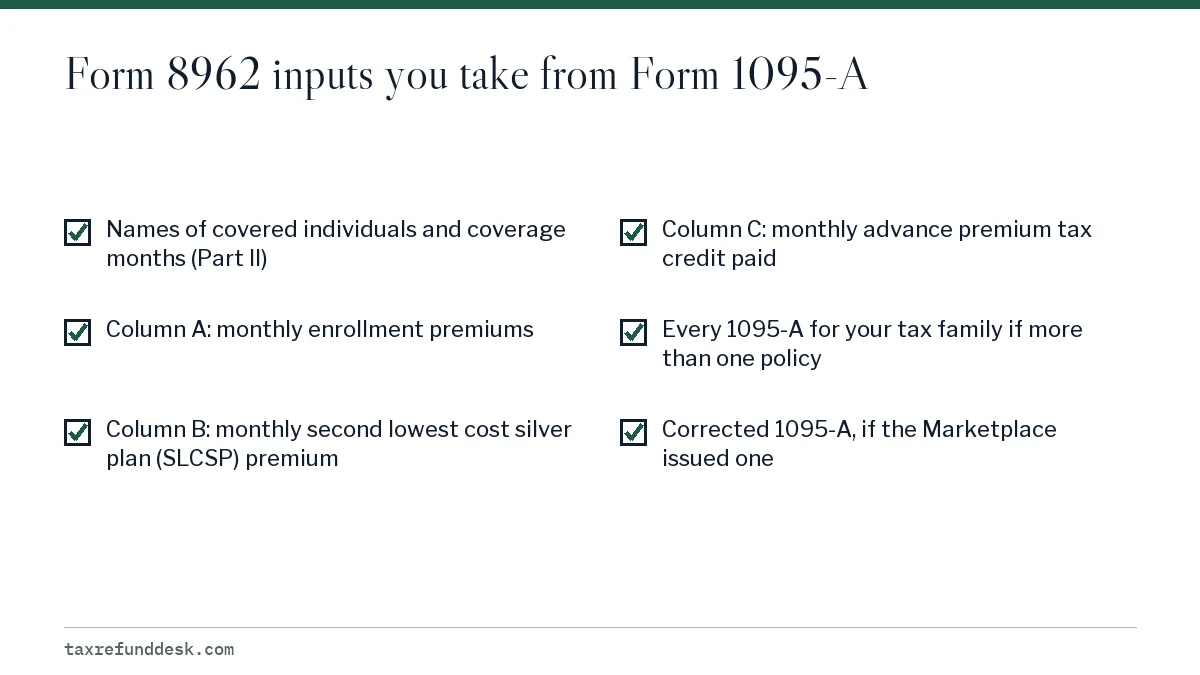
Here is a hypothetical example to show how the numbers connect. Say a 1095-A shows 12 months of coverage with $350 of APTC each month in column C, for $4,200 in total. Form 8962 figures how much credit you were actually allowed based on your final income. If the allowed credit is higher than $4,200, the difference adds to your refund; if lower, some or all of the excess is repaid on your return, which reduces your refund.
That repayment is one reason a refund can come in smaller than expected. Our page on why a tax refund was reduced covers the other common reasons.
Resubmitting after an F8962-070 rejection
Once Form 8962 is complete, resubmit the same return. Keep the rest of the return as it was unless the new form changes a figure that flows elsewhere.
- Attach the completed Form 8962 to the return.
- Check any bank payment you scheduled with the return; the IRS reject page says Step 3 payment options may need re-dating.
- Resubmit and wait for the acceptance message.
- If you used Free File Fillable Forms and cannot complete the form, the IRS page points to an ACA explanation option in Step 4 of that program.
If you are waiting on a corrected 1095-A and the deadline is close, file an extension or use the e-file rejection grace period rules. For what else can go wrong between rejection and refund, see our guide to a rejected tax return.
Step by step
Get Form 1095-A
Download it from your HealthCare.gov or state Marketplace account, or wait for the mailed copy.
Check it
Confirm names, months and amounts; request a correction from the Marketplace if anything is wrong.
Complete Form 8962
Use 1095-A Part III columns A, B and C for each month of coverage.
Resubmit
Attach Form 8962, re-date any scheduled payment, and resubmit the return.
Common questions
Can I file my taxes without Form 1095-A?
Not correctly if APTC was paid, because Form 8962 needs its figures. The IRS says to contact your Marketplace and wait for the form rather than file without it.
I did not get any premium help. Why was my return rejected for Form 8962?
IRS records may show APTC paid for someone in your tax family, such as a spouse or dependent. Check every household member's Marketplace account for a Form 1095-A before assuming the rejection is an error.
Is Form 1095-A the same as Form 1095-B or 1095-C?
No. Only Form 1095-A, from the Marketplace, is used to complete Form 8962. Forms 1095-B and 1095-C come from insurers or employers and are not needed to reconcile the premium tax credit.
What if my Form 1095-A is wrong?
Ask the Marketplace for a corrected Form 1095-A and wait for it before filing. HealthCare.gov says not to file until you have an accurate form; if you already filed, you may need to amend once the corrected form arrives.
Will Form 8962 make me owe money?
It can. If the advance payments were larger than the credit you qualify for based on actual income, part of the excess is repaid on your return, which lowers a refund or creates a balance due.
Sources
- Business rule F8962-070 irs.gov
- Instructions for Form 8962 irs.gov
- Health Insurance Marketplace Statements irs.gov
- How to use Form 1095-A (HealthCare.gov) healthcare.gov
- About Form 8962 irs.gov
We check figures against these official pages. Rules change; confirm anything that affects a deadline or payment with the agency before you act.
Tell us what happened
Describe your situation and our editors will use it to improve this guide. If you leave your email, we may reply with a pointer to the right page or official contact. We never share your details.